Special offer - save up to 40% off on funnel kit.

| Limited time Deal:

01Day
23Hour
55Min
20Sec
New Launch

Social Share for GHL Websites & Funnels

Simplify the process for visitors to share your website pages via social media, messaging services, email, and more. Select from 10 flexible layouts and 24 pre-made presets, then edit each one to suit your brand and make the sharing experience yours.

$10*
Get the Social Share

16 people are viewing this right now

  • No Code Setup
  • Lifetime Update

At a Glance

Best For

  • Businesses & Brands
  • Digital Marketing Agencies
  • Content Creators
  • E-commerce Businesses
  • Marketing Teams

Alternatives

  • Basic Social Sharing Buttons
  • Static Social Media Links
  • Default Sharing Widgets

Dashboard Integration

GoHighLevel

Widget Features

  • 10 Flexible Sharing Layouts
  • 24 Ready-Made Design Presets
  • 34 Sharing Channels & Actions
  • Custom Sharing Channels
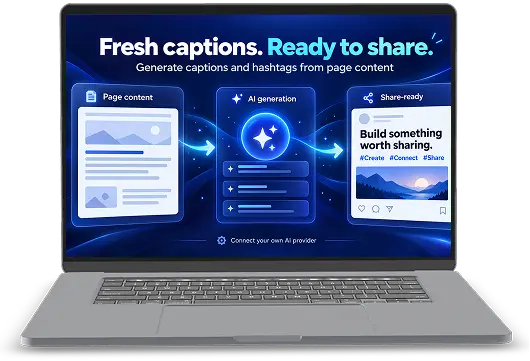
  • AI-Generated Captions & Hashtags
  • Custom Icon Uploads
  • Flexible Button Styling
  • Channel Ordering & Custom Labels
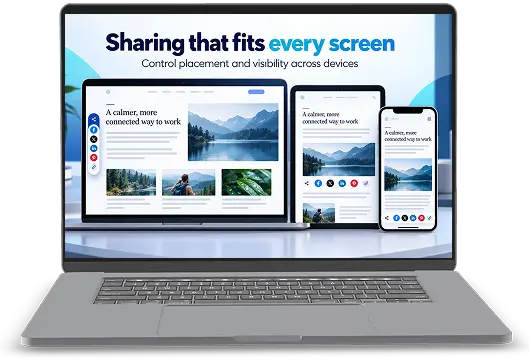
  • Device-Specific Visibility
  • Responsive Design Controls
  • UTM Parameter Support
  • Live Device Preview
  • Custom CSS Support
How to add Social Share button in your Funnel | Sharing Widget Tutorial

Make Every Page Easier to Share

People visit your site and may find your content useful, but for most people, that doesn't mean that they will share it with others. Basic social sharing buttons can also look disconnected from your website, offer limited customization, and make it difficult to provide convenient sharing options.

Add customizable sharing buttons with Social Share to enable visitors to share your pages via their social networks, messaging apps, email, and more. Design the layout, how you are sharing, and how you want it to look, and ensure it's an understandable experience that encourages visitors to share your content.

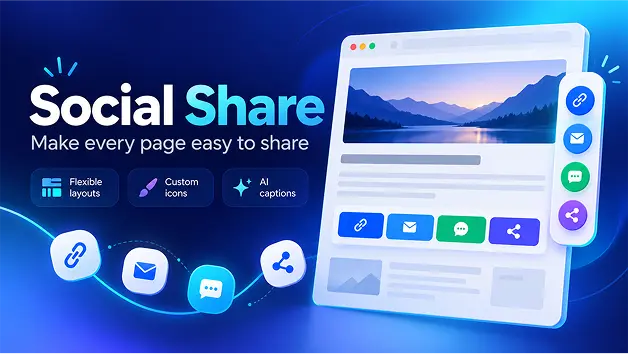
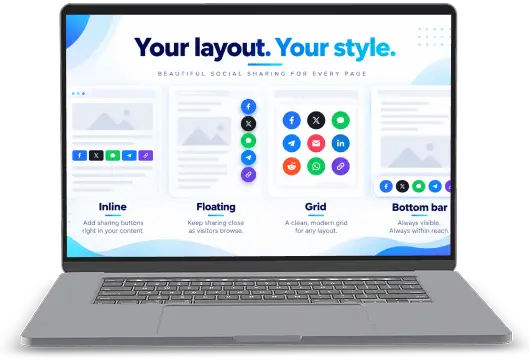
10 Layouts for Every Sharing Experience

Display sharing buttons in different positions and formats to suit your website design. Select from 10 flexible layouts to ensure sharing options are always visible but don't interfere with browsing.

  • Inline & Vertical Stack: Arrange sharing buttons horizontally or display them in a simple vertical column.
  • Responsive Grid & Cards: Organize channels into structured grids or larger buttons with more visual space.
  • Editorial Split & Banner: Merge sharing controls with headings and descriptions in a prominent layout.
  • Left & Right Floating Rails: Keep sharing options visible along either side of your webpage.
  • Sticky Bottom Dock & Expandable Panel: Give visitors a fixed bottom sharing bar or let visitors reveal additional channels when needed.
GHL Social Share Widget

Share Across 34 Channels & Actions

Provide multiple ways to share content to your visitors with popular social networks, messaging apps, and built-in share actions. Set up channels and format each channel's presentation.

  • Social Platforms: Add Facebook, X, LinkedIn, Pinterest, Reddit, Bluesky, Threads, Tumblr, and other supported platforms.
  • Messaging Options: Share Via WhatsApp, Telegram, LINE, Viber, email, and SMS.
  • Popular Apps: Add copy and open feature for Instagram, TikTok, Snapchat, Discord, Signal, and Messenger.
  • Quick Sharing Actions: Enable visitors to share a page link, copy, or print the content from their device's share sheet.
  • Custom Channels: Add your own HTTPS sharing URLs with customisable placeholders for pages, titles, messages, images, and hashtags.

Customize Every Sharing Detail to Match Your Brand

Develop social sharing buttons that seamlessly fit into your site. Select a pre-made design, customize single components, and influence the appearance of the Widget on different devices.

  • Choose from 24 pre-designed design templates that feature brand pills, social circles, outline buttons, monochrome styles, and colorful cards.
  • Change button colors, shapes, typography and spacing, shadows, corner radius, and hover effects.
  • Select an icon-only, icon-and-label, or label-only display. Use original platform icons, select from 51 built-in icons, or upload custom icons.
  • Use different grids, spacing, visibility, and layouts for desktop, tablet, and mobile.
  • Personalize sharing titles, messages, and URLs. Add UTM parameters, set channel tooltips, and allow for certain browser events.
GHL Social Share Widget
Setup Process

From Setup to Social Sharing in 4 Simple Steps

Choose your channels, customize, and publish with ease.

  1. Step : 1

    Add the Social Share Widget

    Add a Social Share widget to your website or funnel page and open its settings editor.

  2. Step : 2

    Select Your Sharing Channels

    Select the social networks, messenger applications, email, and other sharing activities you wish visitors to have access to. Arrange them in your preferred order.

  3. Step : 3

    Choose a Layout and Customize

    Choose from 10 layouts and 24 design presets. Customize the styles, colors, images, labels, spacing, and responsiveness of the buttons to suit your website.

  4. Step : 4

    Preview and Publish

    Test the widget on a desktop, tablet, and mobile view. Refine, save your settings, and publish it to your website or funnel.

What Our Clients Say!

Looking for the right tools to improve your business website? Pennine Technolabs brings practical solutions that help businesses create better digital experiences. Our Reviews Speak Louder!!

5 out of 5 stars

Using Pennine's tools for our account at GoHighLevel has been really helpful, the features are great and easy to use and they are saving time in our daily work.

Alex Morgan

Agency Owner
5 out of 5 stars

A good set of helpful tools for GoHighLevel. The setup is simple, and solutions are working to help our workflows without any complexity.

Daniel Carter

Marketing Consultant
5 out of 5 stars

We appreciate simplicity & value of Pennine's marketplace products. They offer good features that make customizing and managing our projects more easier.

Sarah Mitchell

Business Owner
5 out of 5 stars

I had a fantastic experience! They were incredibly easy to deal with and always quick to respond and very efficient. The entire process was smooth and hassle-free, making everything so much easier.

Jack Fricker

Owner
5 out of 5 stars

We had an amazing experience with Pennine; their professional and knowledgeable team delivered beyond our expectations. They understood our requirements perfectly and provided innovative solutions. Highly recommended!

Colleen Nagle

CEO

FAQs on Social Share

A Social Share Widget is a website feature that allows visitors to share page content through social networks, messaging apps, email, and other supported channels. It makes sharing easier and helps businesses to provide a uniform website experience.

Social Share comes with 10 layouts: Inline, Vertical Stack, Responsive Grid, Cards, Editorial Split, Banner, Left Floating Rail, Right Floating Rail, Sticky Bottom Dock, and Expandable Panel. Each layout offers a different way to display sharing options.

It can be used with Facebook, X, LinkedIn, Pinterest, Reddit, Bluesky, Threads, Tumblr, WhatsApp, Telegram, LINE, email, SMS, and other platforms and apps. There are also device sharing, link copying, and print options that a visitor can use.

Yes. The button colours, shapes, typography, spacing, shadows, hover effects, and icon placement can be customized. There are also 24 design presets available, and you can incorporate custom icons.

Yes. Social Share has custom channel support via HTTPS sharing URLs. Use configurable placeholders like page URL, page title, message, image, hashtags, etc.

Ready to Make Your Content More Shareable?

Contact Us