Special offer - save up to 40% off on funnel kit.

| Limited time Deal:

01Day
23Hour
55Min
20Sec
New Widget

GoHighLevel Gallery Widget for Websites

Showcase your creative work with visually engaging portfolio layouts, smooth animations, and a full-screen lightbox. Select from four unique layouts, categorize projects, edit each design element, and develop a polished portfolio without the need for coding.

$10*
Install Gallery Widget

16 People are viewing this Right Now!

  • Ready To Use
  • Regular Updates

At a Glance

Best For

  • Designers and Creative Professionals
  • Freelancers
  • Creative Agencies
  • Photographers and Videographers

Alternatives

  • Basic Image Galleries
  • Static Portfolio Grids
  • Traditional Printed Menus

Integration

GoHighLevel
Web API

Key Features

  • 4 Distinctive Portfolio Layouts
  • Bento Grid Design
  • Interactive Project Index
  • Staggered Image Showcase
  • YouTube & Vimeo Video Support
  • Full-Screen Lightbox
  • Project Categories & Filters
  • Custom Project Tile Sizes
Gallery Widget | Create Stunning Image & Video Galleries | Pennine Technolabs

Make Your Creative Work Stand Out

A simple image grid might show your work, but it rarely looks great or interactive enough to make your projects easily remembered. Without flexible layouts, project categories, and engaging previews, visitors may find it difficult to explore your Gallery.

Gallery Widget will help you show off your projects in a more creative and organized manner. Select unique layouts, insert photos or videos, emphasize project information, and allow visitors to experience your projects through an immersive lightbox experience.

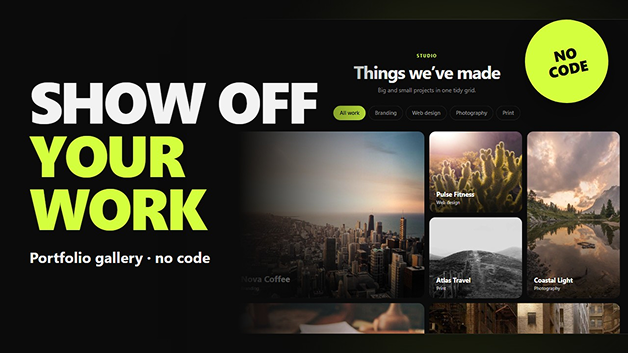
4 Distinctive Layouts to Showcase Your Work

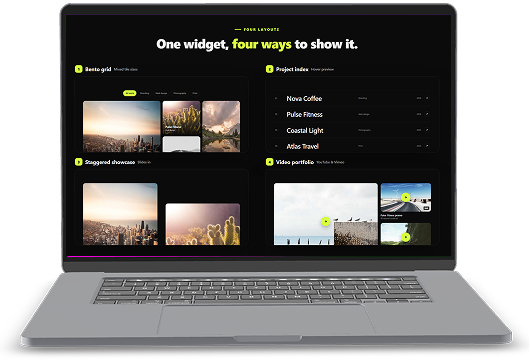
Showcase your projects using various visual presentations, which reflect your creative style. Select from four layouts that will make your Gallery more interesting and easier to navigate.

  • Bento Grid: Show projects in an interactive grid with mixed tile sizes, including large, wide, and tall project tiles. Add Category filters to assist visitors in browsing your work.
  • Project Index: Displays projects in a clean numbered list with images as a preview, and follows the mouse cursor so the visitor can interactively browse.
  • Staggered Showcase: Display large-size images of the projects in two columns with smooth scrolling and animation effects.
  • Video Portfolio: Display a video portfolio through YouTube or Vimeo and allow visitors to open a full-screen lightbox of videos.
GHL Gallery Widget
GHL Gallery Widget

Create an Immersive Project Viewing Experience

Provide visitors with a more interactive full-screen viewing experience of your projects. Present essential project data, images, and facilitate user navigation across devices.

  • Full-Screen Lightbox: Open project images and videos in an immersive viewing experience without distractions.
  • Project Details: Add project titles and project descriptions to your presentation with your visuals to provide additional context.
  • Easy Navigation: Allow visitors to navigate from one project to another with the arrow keys, swiping, or the Escape key.
  • Category-Based Browsing: For each project, define more than one category and guide visitors through the relevant work.
  • Visible Project Navigation: Only show projects that are visible in the lightbox navigation for a more organized experience.

Customize Every Detail to Match Your Brand

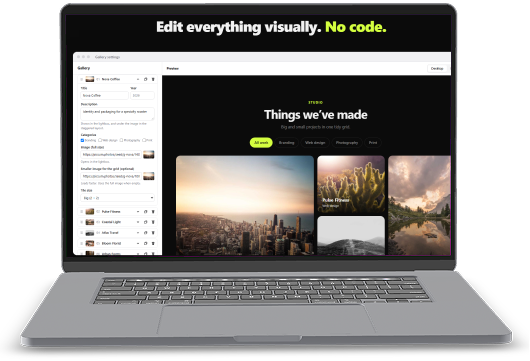
Create a Gallery that is part of your website's overall design. Organize projects, edit layouts, and format them for desktop and mobile platforms using the visual editor.

  • Easy Project Management: Add, duplicate, reorder, and delete projects directly from the visual editor.
  • Flexible Tile Sizes: Adjust individual project tiles to suit your preferred format for your Gallery.
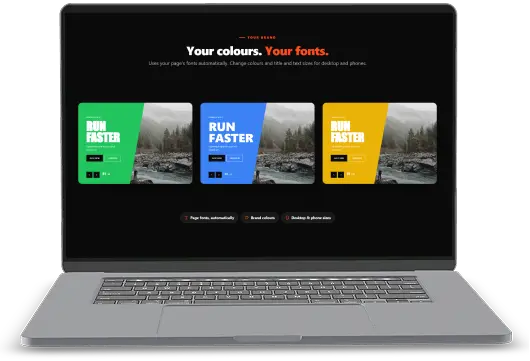
  • Custom Typography: Automatic inherit of your page fonts or custom choice of fonts for title and text separately for desktop and mobile devices.
  • Brand-Based Styling: You can change the accent, text, tile, and background colors to ensure a unified visual appearance.
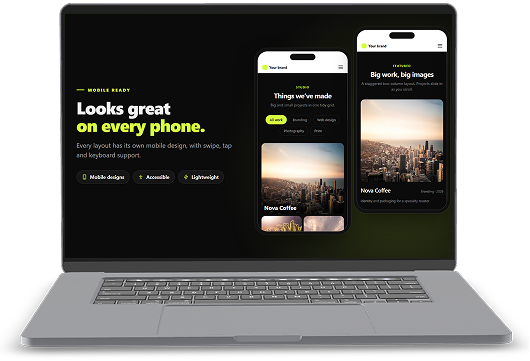
  • Responsive Mobile Design: Use dedicated mobile designs for every layout, with live desktop and mobile previews.
GHL Gallery Widget
Setup Process

Turn Your Projects into a Stunning Gallery in 4 Simple Steps

Add your projects, choose a layout, customize the design, and publish your gallery.

  1. Step : 1

    Add the Gallery Widget

    Place the widget on your website or funnel page and open its settings to start building your Gallery.

  2. Step : 2

    Add Your Projects

    Upload images of your projects or YouTube and Vimeo videos. Add project titles, descriptions, categories, and other details.

  3. Step : 3

    Choose a Layout and Customize

    Choose from four layouts: Bento Grid, Project Index, Staggered Showcase, or Video Portfolio. Fine-tune the size of the tiles, typography, colour, and other design parameters.

  4. Step : 4

    Preview and Publish

    Check your Gallery on the desktop and on mobile. Try out the project navigation and lightbox functionality, and then create your gallery for publishing on your website or funnel.

What Our Clients Say!

Looking for the right tools to improve your business website? Pennine Technolabs brings practical solutions that help businesses create better digital experiences. Our Reviews Speak Louder!!

5 out of 5 stars

I had a fantastic experience! They were incredibly easy to deal with and always quick to respond and very efficient. The entire process was smooth and hassle-free, making everything so much easier. I highly recommend their services to any Australians looking for a reliable and responsive team.

Jack Fricker

Agency Owner
5 out of 5 stars

We had an amazing experience with Pennine, their professional and knowledgeable team delivered beyond our expectations. They understood our requirements perfectly and provided innovative solutions. Highly recommended!

Colleen Nagle

Marketing Consultant
5 out of 5 stars

Pennine Technolabs created a magnificent ecommerce website for us that looks great and performs innocently. His team was professional, responsible and easy to work from beginning to end. We are really happy with the results and highly recommends their services!

Jorven Kael

Business Owner

FAQs on Gallery Widget

Gallery Widget is a customizable Gallery that enables designers, photographers, creative agencies, freelancers, and businesses to share their projects on their websites and funnels. It supports several layouts, interactive preview, and has a no coding full screen lightbox.

Gallery Widget has four layouts: Bento Grid, Project Index, Staggered Showcase, and Video Portfolio. There are different ways of presenting images and creative projects in each layout.

Yes. Video projects can be presented on YouTube or Vimeo. Users can click on videos to launch in a full-screen lightbox.

Yes. Projects may have more than one category. The Bento Grid layout also features category filter buttons so visitors can explore different types of work.

Yes. Images and videos can be displayed in a full-screen lightbox. They can also check out project titles and descriptions, as well as navigate using the arrow keys, swiping, or the Esc key.

Ready to Showcase Your Best Work in Style?

Contact Us