Special offer - save up to 40% off on funnel kit.

| Limited time Deal:

01Day
23Hour
55Min
20Sec
GoHighLevel App

GoHealth: GHL Sub-Account Health Monitoring

Monitor sub-account health with one health score and catch problems before your clients do. This health monitoring app scans every 15 minutes and is 100% read-only.

$15*
Install Now

16 people are viewing this right now

  • Available Now
  • Lifetime updates

At a Glance

Best For

  • GHL Agencies
  • Marketing Agencies
  • GHL Admins

Alternatives

  • Manual Account Checks
  • Custom Alert Workflows

Integration

GoHighLevel

Key Features

  • Dashboard Health Score
  • Scans Every 15 Minutes
  • Critical, Warning, Info Levels
  • Direct Issue Links
  • Workflow Inactivity Tracking
  • Conversation AI and Voice AI Monitoring
  • Wallet and Failed Payment Tracking
  • Agency-Wide Overview
GoHealth Dashboard for GoHighLevel (Full Walkthrough)

Why GoHighLevel Agencies Need Sub-Account Health Monitoring

Managing many client accounts makes it easy to miss a workflow that stopped getting contacts, failing messages or a low wallet. Often the first sign is a client asking what went wrong. Checking every account by hand takes time your team rarely has.

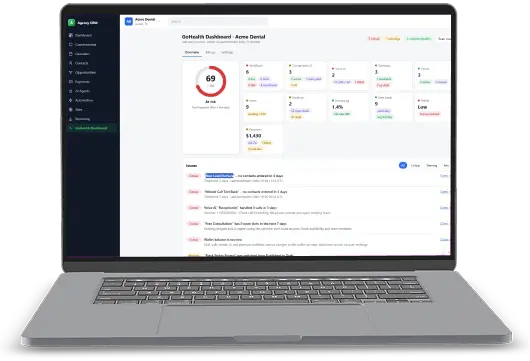
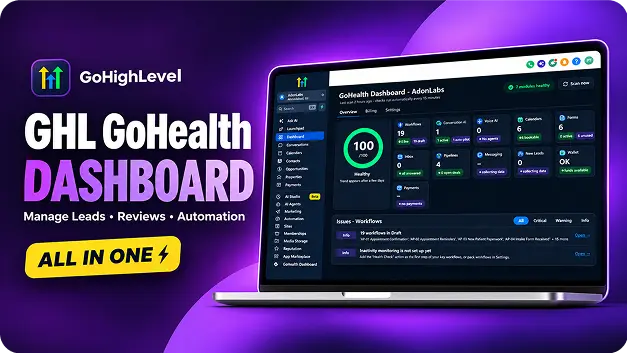
Your dashboard shows your data. GoHealth adds a dashboard monitoring layer that checks for problems and gives each sub-account a dashboard health score. It works like a sub-account auditor, showing your team where to look first.

Workflow Monitoring Across Every Sub-Account, Every 15 Minutes

GoHealth runs an automated app health check on each sub-account every 15 minutes. It detects and flags issues. Your team still investigates and fixes them.

  • Workflow monitoring flags workflows that receive no new contacts within a period you set.
  • Conversation AI and Voice AI agents are monitored for detected issues.
  • Calendars, forms and inbox responsiveness are checked for problems that affect bookings and leads.
  • Stale pipeline deals, message failure rates and new lead activity are tracked in one place.
GHL GoHealth Dashboard Monitoring

Error Alerts With Direct Links to the Problem

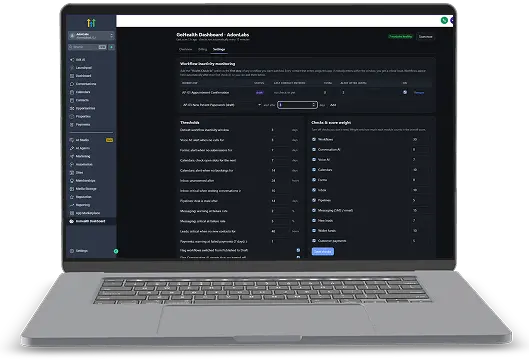
When GoHealth detects a problem, you don’t have to search for it. Each warning or error links to the workflow, setting or module to investigate. Adjust monitoring and alert settings to fit how your team works.

  • Direct links take you from a detected issue to the exact workflow or setting.
  • Configurable monitoring and alert settings let you choose what gets watched.
  • The “Health issue detected” trigger can start your own notification workflows.
  • The native “Health Check-in” workflow action works inside your HighLevel automations.
  • Example: if a lead-nurture workflow gets no contacts in your set period, GoHealth flags it so your team can find out why.

Agency Monitoring With Wallet and Failed Payment Alerts

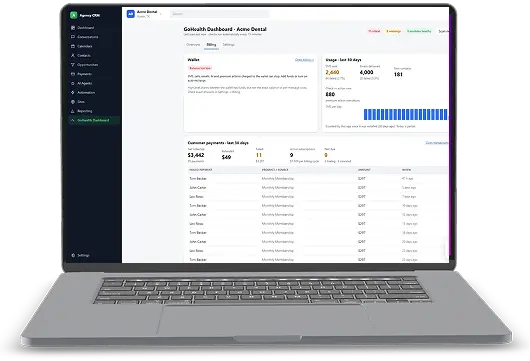
See every client sub-account in one view, ranked by health score. Accounts that need attention rise to the top, so your team doesn’t check each one separately. A low wallet or failed payment is easier to act on when you see it early.

  • Wallet balance monitoring helps you spot low balances early.
  • Failed payment alerts make payment issues visible once detected.
  • Message delivery statistics and past-due invoices sit in one place.
  • Color-coded Critical, Warning and Info levels show where to start.
GHL GoHealth Dashboard Monitoring
Setup Process

How GoHealth Works in 4 Steps

Read-only monitoring for your GoHighLevel sub-accounts. No changes to your account data.

  1. Step : 1

    Get GoHealth

    Access GoHealth for your HighLevel account. (Install steps pending, see note 1.)

  2. Step : 2

    Set Monitoring Preferences

    Choose what to monitor and configure alert settings, including workflow inactivity periods.

  3. Step : 3

    Review Health Scores

    Check each sub-account’s score and see which issues were detected, sorted by severity.

  4. Step : 4

    Act on Detected Issues

    Open the linked issue to investigate. Use the Health issue detected trigger to notify your team.

What Our Customers Say

See how our solutions help businesses save time and make everyday tasks easier.

5 out of 5 stars

Using Pennine's tools for our account at GoHighLevel has been really helpful, the features are great and easy to use and they are saving time in our daily work.

Alex Morgan

Agency Owner
5 out of 5 stars

A good set of helpful tools for GoHighLevel. The setup is simple, and solutions are working to help our workflows without any complexity.

Daniel Carter

Marketing Consultant
5 out of 5 stars

We appreciate simplicity & value of Pennine's marketplace products. They offer good features that make customizing and managing our projects more easier.

Sarah Mitchell

Business Owner
5 out of 5 stars

I had a fantastic experience! They were incredibly easy to deal with and always quick to respond and very efficient. The entire process was smooth and hassle-free, making everything so much easier.

Jack Fricker

Owner
5 out of 5 stars

We had an amazing experience with Pennine; their professional and knowledgeable team delivered beyond our expectations. They understood our requirements perfectly and provided innovative solutions. Highly recommended!

Colleen Nagle

CEO

Frequently Asked Questions

GoHealth is a GoHighLevel Health Monitoring solution designed to help businesses organize customer information, manage follow-ups, and streamline their workflows within GoHighLevel. Its specific features depend on the setup and integrations included.

GoHighLevel can help manage leads, automate appointment reminders, follow up with prospects, and maintain customer communication from one platform. A suitable snapshot or workflow setup can help reduce repetitive administrative tasks.

GoHealth aims to make health monitoring workflows easier to manage by bringing relevant processes into the GoHighLevel environment. Check the product’s included features and integrations to determine which monitoring tasks can be handled through the app.

Ready to improve your GHL Dashboard?

Contact Us