Create eye-catching hero sections with image and video backgrounds that capture visitors' attention. Select from 4 unique layouts, add headlines and call-to-action buttons to slides, and create responsive banners using the simple visual editor.
Custom Footer for GHL Websites & Funnels
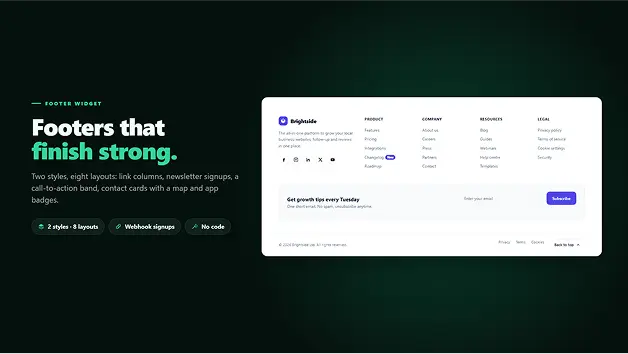
Build a professional website footer that will bring navigation links, newsletter signup, contact information, and social media into one convenient place. Select between two visual styles and eight flexible layouts and make each section look like your brand without coding; create a responsive footer.
45 People are viewing this Right Now!
At a Glance
Best For
- Business Websites
- Service-Based Businesses
- Digital Marketing Firms
- E-commerce Stores
Alternatives
- Basic Website Footers
- Static Footer Templates
- Manually Designed Footer Sections
Integration
GoHighlevel
Key Feature
- 2 Visual Styles: Clean & Midnight
- 8 Ready-Made Footer Layouts
- Custom Footer Navigation Links
- Newsletter Signup Forms
- Webhook & Third-Party Form Integrations
- Contact Cards with Maps
- Payment, Language & Currency Menus
- 8 Social Networks & Custom Icons
- App Store & Google Play Badges
- Customizable CTA Sections

Give Every Page a Professional Finishing Touch
A basic website footer often does little more than display copyright information and a few links. Important navigation pages, contact details, newsletter forms, and social media links can become scattered or difficult for visitors to find.
Custom Footer brings these elements together in one organized space. Design custom branded footer elements that include navigation, newsletter signup, contact info, maps, and calls-to-action. Select an appropriate template for your website and ensure critical content is more accessible on all devices.

8 Footer Layouts for Different Website Needs
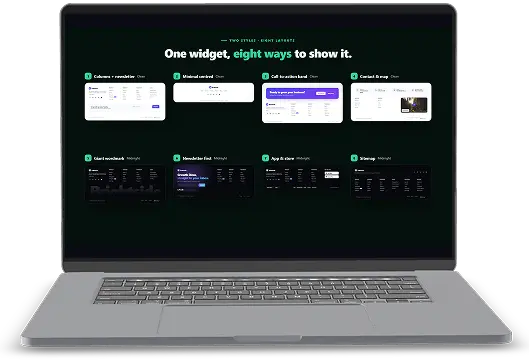
Design a footer that aligns with your website's style and design. Select from two visual styles and 8 pre-made layouts for various business needs.
- Columns & Newsletter: Use multiple navigation columns to link multiple pages and a newsletter signup column to collect visitors' emails.
- Minimal Centred: Keep your website footer simple with a centred layout that focuses on important information.
- CTA Band: Use a call-to-action band to highlight critical actions and customizable buttons.
- Contact & Map: Show your business contact details alongside a map to help visitors locate you and reach out to you.
- Giant Wordmark: Add more visibility for your brand with a large wordmark header design.


Bring Navigation, Sign-Ups, and Contact Details Together
Give visitors convenient access to important website information through flexible footer sections. Structure your links, gather email addresses, and facilitate your customers reaching your business.
- Custom Footer Navigation Links: Add several columns of links, reorder navigation items, and display selected navigation items with custom badges like New.
- Newsletter Signup Forms: Gather visitor e-mail addresses with built-in validation and customize confirmation emails.
- Webhook & Form Integrations: Submit newsletter leads to webhooks linked to Zapier, Make, n8n, or a CRM. Forms can be reused via links or Embed code.
- Branded Contact Cards: Show business addresses, hours, phone numbers, and email addresses with clickable contact information.
- Interactive Map Options: Add a map image or live map to help visitors locate your business.
Customize Every Detail to Match Your Brand
Create a brand footer that seamlessly integrates into your website. Make it look the way you want, and add useful website elements, along with creating a responsive design that works on various devices.
- Custom Design & Typography: Choose between Clean and Midnight styles, pick from the existing fonts on the page or choose your own, and adjust colours, spacing, and content width.
- Social Media & Custom Icons: Add links to eight social networks and use custom icons for your logo, contact cards, and other footer items.
- App & Payment Elements: Show App Store and Google Play logos, payment icons, language menus, and currency menus linked to your pages.
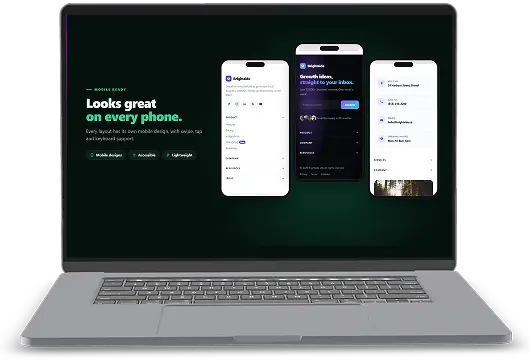
- Responsive Footer Design: Use dedicated mobile layouts with collapsible navigation sections to keep content organized on smaller screens.
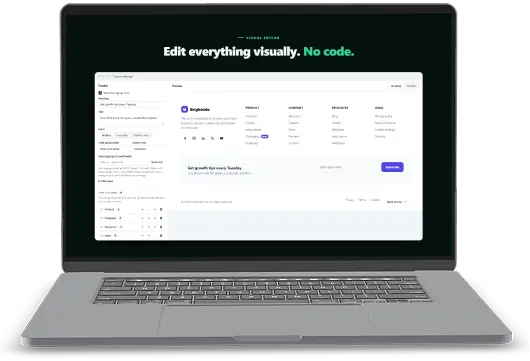
- Live Preview & Saved Changes: Instantly view your design changes while editing and save designs for later edits.

Create a Professional Website Footer in 4 Simple Steps
Add your content, customize the design, and publish your branded footer.
-
Step : 1
Add the Custom Footer Widget
Put the widget on your website or funnel page, then click the settings to begin creating your footer.
-
Step : 2
Add Your Footer Content
Add navigation columns, link to important pages, set up a newsletter form, or add contact information, social links, and other elements to the footer.
-
Step : 3
Choose a Layout and Customize
Select from Clean or Midnight styles and eight layouts. Use custom fonts, colours, spacing, buttons, badges, and other design aspects to align with your brand.
-
Step : 4
Preview and Publish
Check your footer on both desktop and mobile. Test navigation links and form submissions, make your final changes, and publish it on your website.
What Our Customers Say
See how our solutions help businesses save time and make everyday tasks easier.
Frequently Ask Questions
Custom Footer is a website footer builder tool that enables businesses to develop expert and branded footer sections that include navigation links, newsletter types, contact details, social icons, and CTAs. It provides customizable layouts, responsive and no-code designs.
Custom Footer has two visual styles, Clean and Midnight, and four layouts in each, allowing for a total of eight layouts. These include multi-column navigation, minimal centred, CTA band, contact and map, giant wordmark, newsletter-first, app and store, and sitemap layout.
Yes. You can create multiple navigation columns, add and reorder links, and highlight selected links using custom badges such as New. This helps visitors discover key pages of the website with ease.
Yes. Custom Footer offers newsletter sign-up options, email validation, and customizable confirmation messages. It’s also possible to integrate submissions with webhooks, as well as with pre-existing third-party forms via links and embed code.
You can pass submissions to webhooks that are integrated with Zapier, Make, n8n, or your CRM. There is also a built-in option for submitting tests to the widget.