Special offer - save up to 40% off on funnel kit.

| Limited time Deal:

01Day
23Hour
55Min
20Sec
New Launch

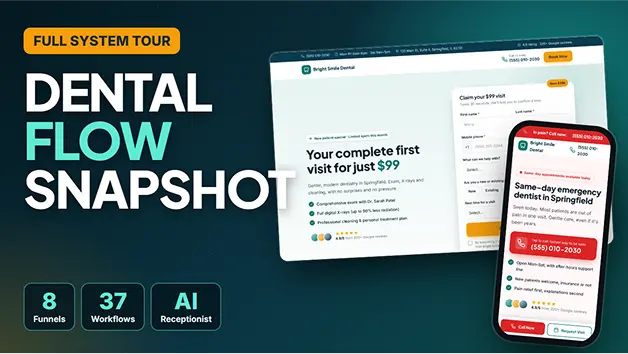
DentalFlow: Dental Clinic Automation for GoHighLevel

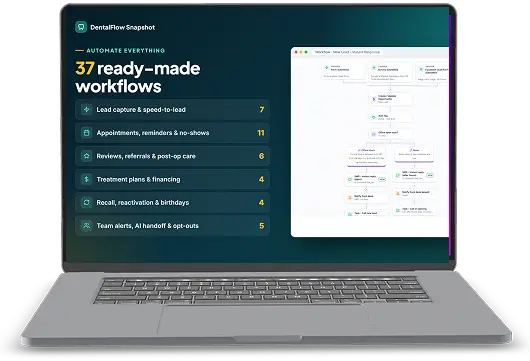
A ready-made GHL dental snapshot with a dental AI receptionist, 4 patient pipelines, and 28 workflows. Answer every inquiry, fill the schedule, and never miss any lead.

$89*
Install Now

16 people are viewing this right now

  • Available Now
  • Lifetime updates

At a Glance

Best For

  • Dental Clinics
  • Multi-Location Practices
  • Orthodontists
  • Dental Agencies

Alternatives

  • Manual Reminders
  • Building From Scratch

Integration

GoHighLevel

Key Features

  • Dental AI Receptionist
  • Missed-Call Text-Back
  • 4 Patient Pipelines
  • 28 Pre-Built Workflows
  • 2-Way Appointment Reminders
  • Treatment Plan Follow-Up
  • 6-Month Recall Automation
  • Review Requests
DentalFlow Snapshot for GoHighLevel | AI Receptionist, Patient Booking & Automated Pipelines

Never Miss a New Patient or an Unscheduled Treatment Plan Again

Your front desk is checking patients in, so inquiries wait, appointments go unconfirmed and treatment plans go quiet. Each one is a patient who may book with another practice.

DentalFlow connects inquiry response, appointment booking, treatment follow-up and recall in one dental clinic automation system. Your team handles real conversations. The system handles the repeat work. It works alongside your practice management software and does not replace it.

A Dental AI Receptionist That Answers, Qualifies and Books

Built on GoHighLevel Conversation AI, the dental AI receptionist collects patient details and books into your connected calendars. It handles administrative conversations only and never diagnoses.

  • Instant SMS and email within 60 seconds of a form, chat or ad lead lets lead generation turn into a conversation, with a staff alert.
  • Missed-call text-back starts a conversation, then the AI bot for dental inquiries takes over.
  • Answers hours, insurance, parking and offers, then completes dental appointment booking.
  • Hands off to your team for clinical, billing or frustrated-patient conversations.
GHL DentalFlow Snapshot

Follow Up Automatically While Your Team Treats Patients

From confirmation to recall, patient follow-up runs on schedules you can edit. Treatment follow-ups stop once the patient books.

  • Reminders 3 days, 1 day, and 2 hours before. Patients reply C to confirm or R to reschedule.
  • No-show recovery and cancellation rebooking, with a staff call task and waitlist fill.
  • Unscheduled treatment follow-up on Day 1, 3, 7, 14, and 30, with financing links.
  • Review requests; send happy patients to Google and unhappy ones to a private form.
  • A dental recall system: 6-month recall starts 14 days before due, plus 12+ month reactivation.

A Dental CRM That Shows What Happens After the Inquiry

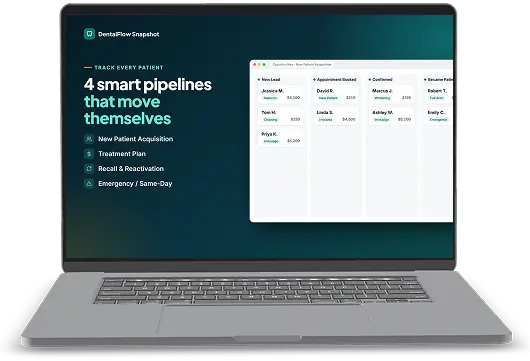
Four pipelines move patients as they reply, book, attend or go quiet. Dashboard widgets show where your process needs attention. They report activity and do not promise results.

  • Pipelines for new patients, treatment plans, recall and optional same-day emergencies.
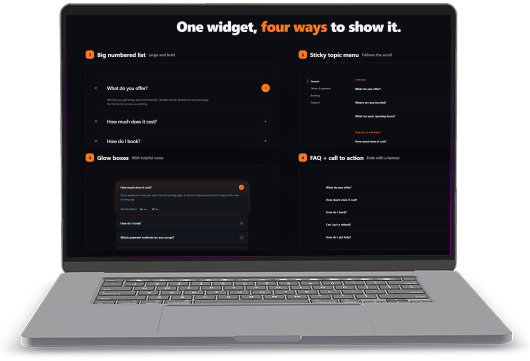
  • Widgets for leads by source, booking, show and no-show rates, treatment acceptance and pipeline value.
  • Custom fields, tags and custom values keep Dental CRM data organized and let you update clinic details once.
  • Round-robin lead assignment and stale-opportunity alerts keep every case owned.
GHL DentalFlow Snapshot
Setup Process

From Import to Launch in 4 Steps

A snapshot carries configuration, not your patient records or phone numbers.

  1. Step : 1

    Import the Snapshot

    Load pipelines, workflows, calendars, forms and funnels into your GoHighLevel sub-account. Review each before activating.

  2. Step : 2

    Add Clinic Details

    Update custom values once: name, phone, hours, booking, review and financing links, and your new-patient offer.

  3. Step : 3

    Configure and Train

    Set calendar availability, then train the AI receptionist on your services and FAQs. Test it in suggestive mode first.

  4. Step : 4

    Test and Launch

    Connect your phone number and SMS registration, run a test lead through every path, then activate.

What Our Customers Say

See how our solutions help businesses save time and make everyday tasks easier.

5 out of 5 stars

Using Pennine's tools for our account at GoHighLevel has been really helpful, the features are great and easy to use and they are saving time in our daily work.

Alex Morgan

Agency Owner
5 out of 5 stars

A good set of helpful tools for GoHighLevel. The setup is simple, and solutions are working to help our workflows without any complexity.

Daniel Carter

Marketing Consultant
5 out of 5 stars

We appreciate simplicity & value of Pennine's marketplace products. They offer good features that make customizing and managing our projects more easier.

Sarah Mitchell

Business Owner
5 out of 5 stars

I had a fantastic experience! They were incredibly easy to deal with and always quick to respond and very efficient. The entire process was smooth and hassle-free, making everything so much easier.

Jack Fricker

Owner
5 out of 5 stars

We had an amazing experience with Pennine; their professional and knowledgeable team delivered beyond our expectations. They understood our requirements perfectly and provided innovative solutions. Highly recommended!

Colleen Nagle

CEO

Frequently Ask Questions

A dental snapshot is a pre-built bundle of pipelines, workflows, calendars, forms, funnels, fields and AI settings that you import into a GoHighLevel account. DentalFlow gives a clinic a working starting point instead of a blank account.

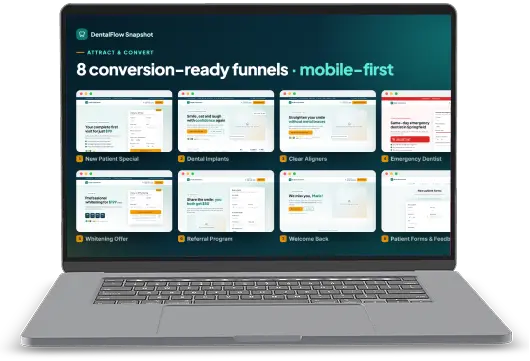
Four pipelines, 28 workflows, five calendars, a configured Conversation AI receptionist, six funnel and landing page types, forms, a treatment-interest quiz, SMS and email templates, custom fields, tags, custom values and dashboard widgets.

Yes, once it is connected to your calendars. The dental AI receptionist collects details, offers times and books the visit. Clinical, billing and sensitive conversations go to your team. The blueprint recommends running it in suggestive mode for the first 1 to 2 weeks.

Not natively. You can connect them with Zapier or Make, a sync service such as NexHealth or Sikka, or a CSV import. Decide this early, because recall dates and attendance status depend on that data.

Compliance depends on how your account is set up. GoHighLevel offers a HIPAA mode as a paid add-on, so confirm current terms. DentalFlow is built to keep clinical details out of SMS and email. Add TCPA consent to your forms.

The 6-month recall workflow starts 14 days before each patient’s recall due date, sends reminders at +7 and +14 days, then moves the patient to Overdue. Patients inactive for 12+ months enter a separate reactivation campaign.

It depends on phone and SMS registration, calendar setup and AI testing. The snapshot removes the build work, not the configuration. An onboarding checklist is included.

Ready to Generate improve your GHL Dashboard?

Contact Us